MERN Stack with Agentic AI Engineering

Become a Full Stack Developer and Agentic AI Engineer with Code IT

MERN Stack with Agentic AI Engineering Course in Nepal

Learn to build modern, scalable, and intelligent web applications with our MERN Stack with Agentic AI Engineering Course at Code IT. This practical, industry-oriented training program takes you from programming fundamentals to advanced full-stack development and AI-powered application engineering.

Master MongoDB, Express.js, React.js, Next.js and Node.js while learning to integrate Large Language Models (LLMs), AI APIs, AI agents, automation workflows, and intelligent multi-agent systems into real-world applications.

Unlike traditional web development courses, this program combines full-stack software engineering with modern Agentic AI technologies, helping you develop applications that can understand instructions, reason through tasks, use tools, interact with APIs, and automate complex workflows.

Whether you are a beginner, student, aspiring software developer, or IT professional, this course will help you develop practical skills to build production-ready web applications and AI-powered software solutions.

Prerequisites
Git & GitHub
MERN Stack with Agentic AI Engineering

MERN Stack with Agentic AI Engineering

Next batch starting soon

Mode: Online (Google Meet) Google Meet
Duration: 3 Months
Rs.3,499/-
Rs.35,000 Save 90%
Enquiry

Have any Question?

WhatsApp: 9862130505
Telephone: 025-575163

Everything You Receive

All-inclusive support — from training to real-world experience

Live Classes

Google Meet
8:00 PM - 9:30 PM

Lifetime Videos

Re-watch anytime

Certification

Industry recognized

Internship

No internships are available right now.

Course Curriculum

Everything you'll learn — from fundamentals to advanced concepts

Course Outlines

  • Full Stack Web Development using the MERN Stack

  • Frontend Development with React.js

  • Backend Development with Node.js and Express.js

  • Database Management with MongoDB.

  • RESTful API Development and Integration

  • AI Integration using Gemini and other LLM APIs

  • Prompt Engineering and Context Engineering

  • AI Agents and Agentic AI Architecture.

Full Curriculum

01 HTML 5
HTML Structure & Basic Tags
Semantic HTML5 Tags
Text Formatting & Elements
HTML Attributes & Best Practice
Project Work
02 CSS 3
CSS Syntax & Selectors
Colors, Backgrounds & Gradients
Typography & Text Styling
Box Model & Spacing
Display & Positioning
Flexbox & CSS Grid
Transitions & Animations
03 Tailwind CSS
Introduction to Tailwind CSS
Setting Up Tailwind
Utility Classes
Responsive Design Made Easy
Flexbox & Grid with Tailwind
Hover, Focus & State Styles
Customizing Tailwind
Animations & Transitions
Component Building
Real-World Project
04 JavaScript
Variables & Data Types
Operators & Expressions
Control Flow
Functions & Scope
DOM Manipulation
Events & Event Listeners
Arrays & Objects
ES6 Features
05 Understanding the DOM and Event Handling
06 Modules and ES6+ Features
07 Backend Development ( Node JS, Express JS, MongoDB with AI )
08 Introduction to Node.js
Overview of Node.js and its architecture
Installing Node.js and setting up the environment
Understanding npm (Node Package Manager)
Writing and running Node.js applications
Core modules: fs, path, http, and os
Creating and managing custom modules
Event-driven architecture and EventEmitter
Asynchronous programming: Callbacks, Promises, and async/await
Error handling in asynchronous operations
Building HTTP servers with Node.js
Working with the file system (fs module)
Creating RESTful APIs
09 Mastering Express.js
Introduction to Express.js and its setup
Middleware: Built-in, third-party, and custom middleware
Request-response cycle in Express.js
Routing: Query parameters, URL parameters, and forms
Building RESTful APIs with Express.js
Template engines: Working with EJS for dynamic content
Error handling in Express.js
Logging and debugging in Express.js applications
Security best practices: Helmet.js, CORS, and sanitization
Authentication basics: JWT (JSON Web Token) integration
10 MongoDB and Mongoose
Overview of NoSQL and MongoDB fundamentals
Installing MongoDB and connecting with Node.js
Introduction to Mongoose: Schemas and models
CRUD operations with Mongoose
Data validation and schema design
Relationships in MongoDB: One-to-Many and Many-to-Many
Querying data: Filtering, sorting, and pagination
Aggregation pipelines in MongoDB
Authentication with JWT: Implementing signup and login functionality
Password hashing and security best practices
Optimizing MongoDB performance
11 Real-World Project
Project planning and architecture design
Implementing user authentication and authorization
Protecting routes with middleware
Creating RESTful API endpoints
Connecting the backend to MongoDB
Input validation and error handling middleware
Securing the application with industry best practices
Testing APIs using Postman or Thunder Client
Deploying the application to a cloud platform (e.g., Heroku or Render)
Finalizing the project and integrating feedback
12 AI integration
Use AI tools for code debugging and refactoring
Integrate AI for generating product details, recommendations, etc.
13 React with Next JS
Introduction to React.js
Discover valuable contents
Code Editor and extensions
Naming conventions (sentence case, camel case, snake case, pascal case)
Initialize react app using vite
JSX
SPA vs SSG vs SSR
Components, states and props
Functional components
Hooks
Files and folder structure
Integrate tailwind
React router overview
React router dom (v6) - createBrowserRouter, createRoutesFromElements
Route
Route element and path
Link vs Navlink
Index & 404 Page
React state management overview
useState and useEffect
State management with React redux Overview
Redux store, actions and reducers
useSelector and useDispatch
Redux slice
Redux thunk
Source Code
Redux persist
Redux devtools
Introduction to react hook forms
Create login & register forms
Error handling
Default values
React Layouts
Main Layout
Auth Layout
Redirect to pages based on auth
14 APIs
Overview
Introduction to axios
Fetch data from API
CRUD operations
Auth API
Localstorage & cookies
Interceptors
15 Introduction to Next.js and Setting Up the Environment
Overview of Next.js and its features
Setting up a Next.js project
Understanding the project structure
Introduction to server-side rendering (SSR)
Creating pages and routes in Next.js
Dynamic routing with parameters
Linking between pages
Navigation using the Next.js router
Fetching data for components using getStaticProps
Server-side rendering (SSR) with getServerSideProps
Client-side rendering (CSR) with useEffect and fetch
SWR (Stale-While-Revalidate) for data fetching
Styling options in Next.js (CSS, SCSS, styled-components)
Global styles and theming
CSS Modules for component-level styling
Optimizing styles for performance
Implementing authentication with NextAuth.js
Securing routes based on user authentication
Social media authentication and third-party providers
16 API Routes and Serverless Functions
Creating API routes in Next.js
Handling HTTP requests with API routes
Deploying serverless functions
Integrating external APIs in Next.js applications
17 Performance Optimization in Next.js
Code splitting and lazy loading in Next.js
Image optimization and responsive images
Pre-rendering and incremental static regeneration
Analyzing and improving performance using tools
18 Agentic AI Engineering
Traditional development vs AI-driven development
Understanding AI coding assistants and agents
Understanding context windows and tokens
Introduction to Claude Code
Installation and configuration
Working with terminal commands and file operations
Managing Claude Code sessions
Writing effective development prompts
CLAUDE.md and project-level instructions
Managing context across sessions
Reusable prompts and instructions
Requirement analysis using Claude
Generating Product Requirement Documents (PRDs)
Breaking features into implementation tasks
AI-assisted implementation
Reviewing and validating generated code
Custom commands and skills
Subagents and specialized agents
Hooks and automation
Model Context Protocol (MCP)
Connecting external tools and services
Building applications from PRDs
Implementing features using agentic workflows
Testing and debugging applications
19 Deployment and Final Project
Final project development and presentations
Open Q&A session and course review

Earn Your Certification

After completing the course, you will receive a professional certificate from Code IT, verified by industry leaders in Nepal.
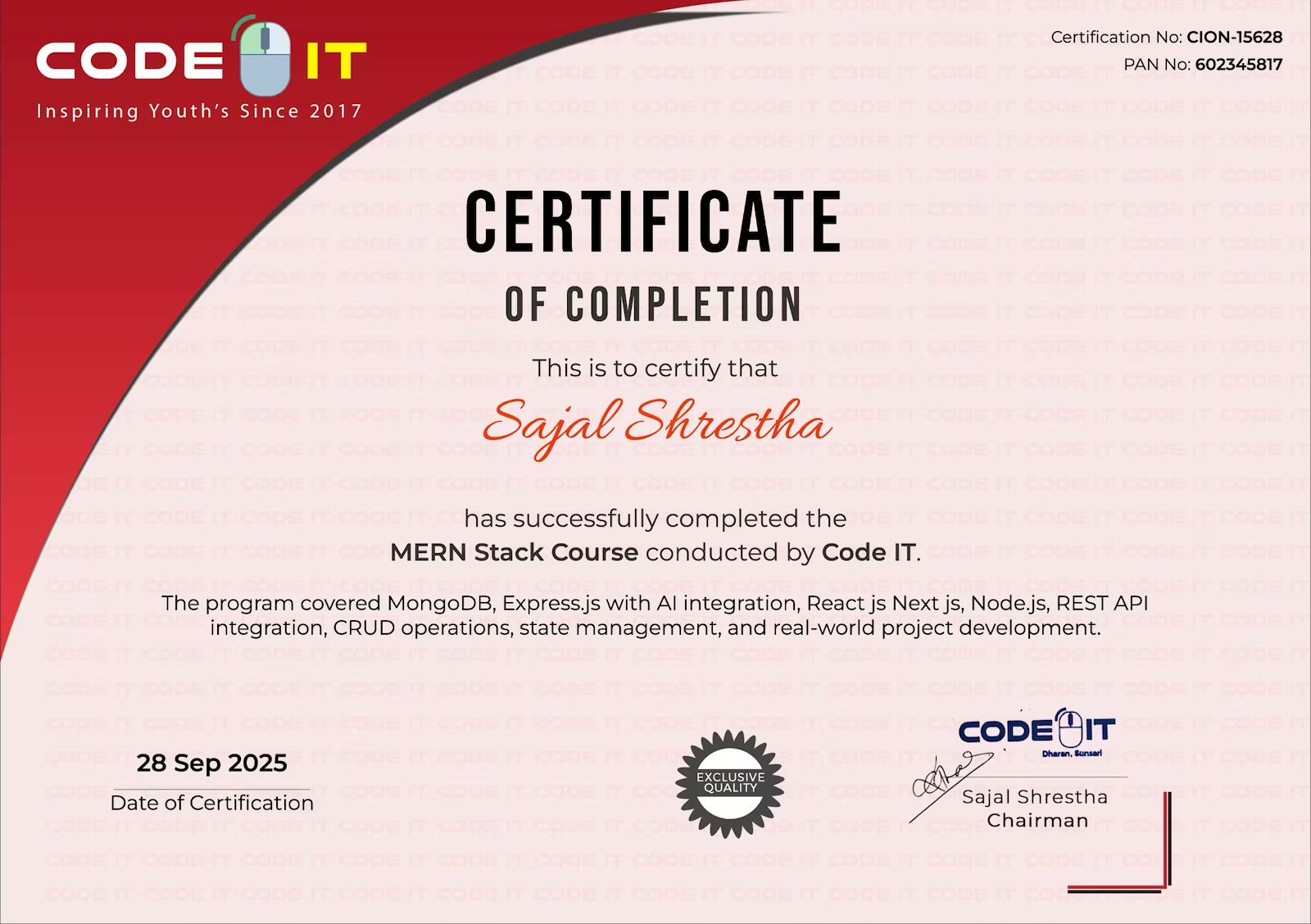
Share your achievement with pride on LinkedIn.
Certificate
Get in Touch

Need More Information?

Our team will respond within a few hours

Why Enquire?

Payment plans & installment options
Certificate & accreditation details
Course level & suitability check
Flexible batch timings
Career guidance & job support

Join 100k+ successful graduates

We'll respond within 2-3 hours during business hours